Mobile 11
Maintenance Connection Canada
What you see
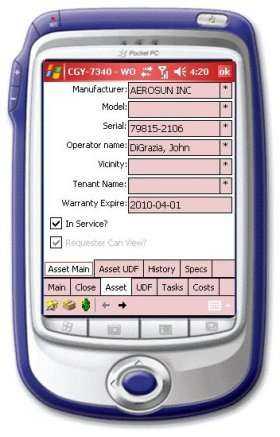
Here we see various summary information for the asset being work on. This is also the jump point to all the other information screens for this asset.
Navigation
<div> <p style='color:black;font-weight:normal'><font face="Arial">
              <img border="0" src="/files/littlebutton.gif" align="bottom">Tap or hover over and click Hist button to see the
              work history for this asset<br>
              <img border="0" src="/files/littlebutton.gif" align="bottom">Tap or hover over and click the Specs button to see the
              pertinent specifications<br>
              <img border="0" src="/files/littlebutton.gif" align="bottom">Tap or hover over and click the Asst UDF button to see the
              user defined fields for this asset<br>
              <img border="0" src="/files/littlebutton.gif" align="bottom">Tap or hover over and click the Main button to go back
              tot he W/O detail screen</font></p>
    </div>