Mobile 10
Maintenance Connection Canada
What you see
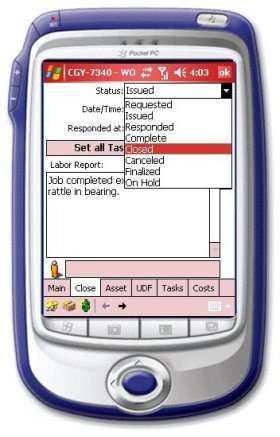
This screen allows the technician in the field to set the new status (usually complete) for this W/O as well as enter a short labor report and select the complete date and time from a pop calendar. As with Costs, this new information will update the main system at the next “sync”.
Navigation
<div style="color:black;font-weight: normal">   <p><font face="Arial">
              <img border="0" src="/files/littlebutton.gif" align="bottom" width="17" height="17">Tap or hover over and click the Asset button to go
              to the asset information of this W/O<br>
              <img border="0" src="/files/littlebutton.gif" align="bottom" width="17" height="17">Tap or hover over and click the Main button to go back to the
              main information of this W/O<br>
              <img border="0" src="/files/littlebutton.gif" align="bottom" width="17" height="17">Tap or hover over and click the OK button<img border="0" src="/files/okbtn.jpg" width="21" height="19">
              to go back to the complete list of all W/Os assigned to this user </font></p></div>